
Find newly registered Swiss companies through the public SOGC/SHAB search: select «New entry», the period and, if needed, a canton. Then check relevant results in Zefix for their registered office and register status. Afterwards, determine which companies suit your offer.
Commercial register, SOGC/SHAB and Zefix: which source handles which step?
The commercial register makes legally relevant details about registered companies public. The Swiss Official Gazette of Commerce, known in German as the Schweizerisches Handelsamtsblatt (SHAB) and here as SOGC/SHAB, publishes the corresponding notices. Zefix is the central company index for searches across Switzerland. It is updated daily, as the Federal Office of Justice explains in relation to the commercial register and Zefix.
For your research, the three sources have different roles:
| Source | Its role in your search |
|---|---|
| Cantonal commercial register | Check the registered details and the register extract for a particular company |
| SOGC/SHAB | Find newly published events by type, period and region |
| Zefix | Search for a company or UID throughout Switzerland, compare its current register status and registered office, and access the cantonal register |
A new entry does not necessarily mean that a new business has been formed. New branches and mergers of existing companies can also trigger a new entry; the Canton of Zurich explains this distinction. The search also captures only registered companies. Sole proprietorships are not always required to register, as the SECO overview of the registration requirement explains.
Finding new entries in SOGC/SHAB: the public search process
Open the public SOGC/SHAB notice search on the «Publications» page. To select only new entries, follow these steps:
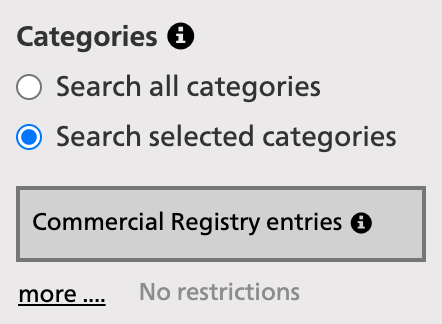
- Under «Categories», select «Search selected categories» and click «Commercial Registry entries».
- Below this, click «more ....». The window «Configure settings for Commercial Registry entries» opens.
- Initially, «New entry», «Change» and «Deletion» are selected. Remove the ticks beside «Change» and «Deletion». Leave only «New entry» selected. The option «Restrict to selected sub-categories» is activated automatically.
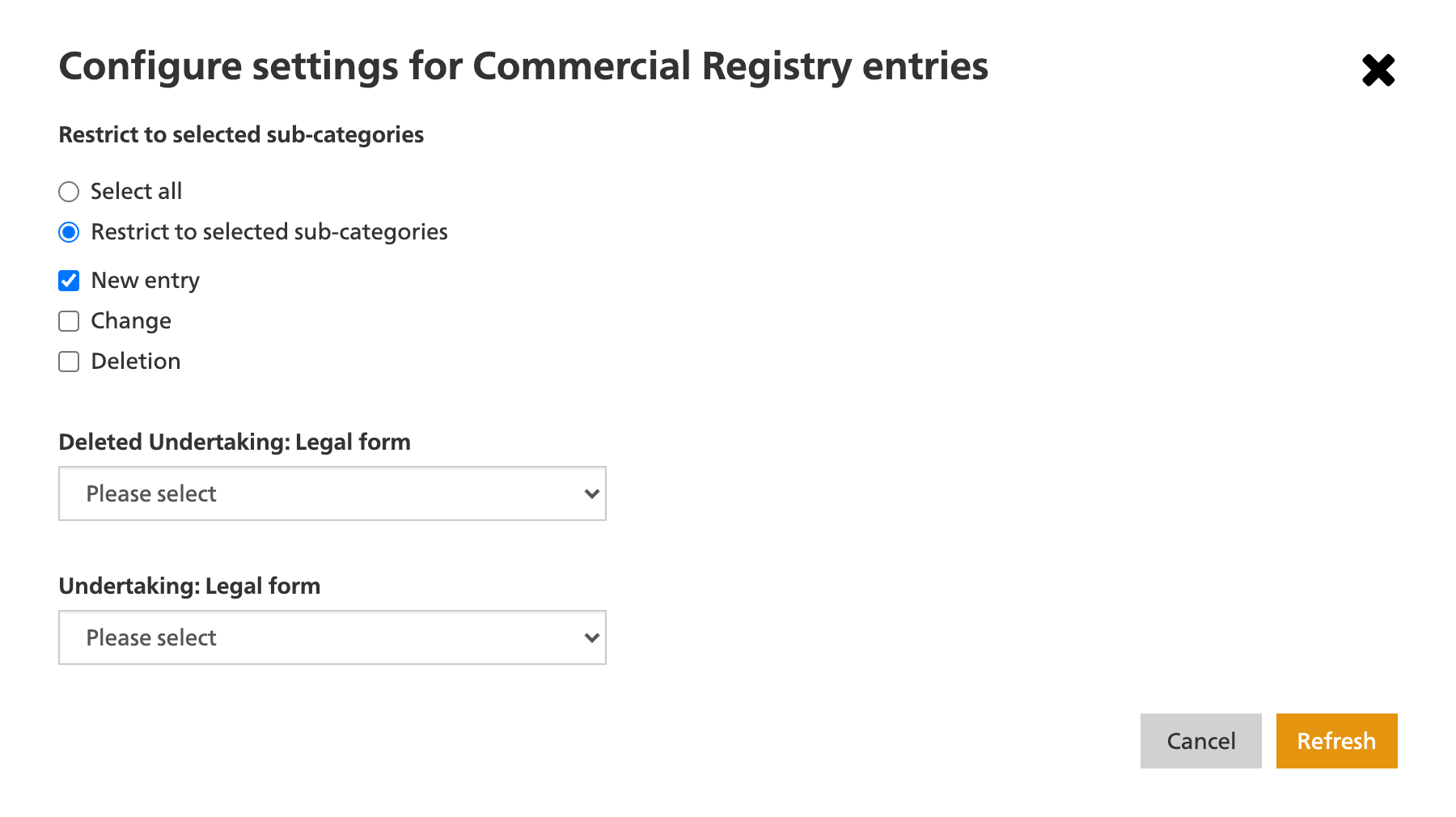
- Confirm with «Refresh». The window closes. The main form now shows the restriction «New entry» beside «Commercial Registry entries», and the results list is updated.
- Set the period, for example the last seven days or a start and end date. If needed, narrow the selection further by canton, postcode or keyword.
For newly published entries in the Canton of Bern, for example, combine «New entry», the last seven days and Canton of Bern. Then check the notices that are relevant to you.
For a small regional selection, start with the event type and period, then read the stated purposes. Keywords help to narrow results down, but they do not capture a complete industry: company purposes can be broadly worded, and notices also appear in French or Italian.
For an initial overview, you can also open the current new companies in Switzerland. If you want to work regularly with your own list, the company formations data subscription supplies new entries selected to your criteria as Excel and CSV files. The next steps show how to assess the companies.
Reading a result correctly, then checking it in Zefix
Record the company name, UID, legal form, registered office, domicile address, stated purpose and event type, as well as the source link. The UID with the CHE prefix makes it possible to identify a company unambiguously even where names are similar.
Keep the date of the daily register entry separate from the SOGC/SHAB publication date. They can differ, as the Canton of Zurich explains regarding the timing between a register entry and SOGC/SHAB publication.
Then search for the company in Zefix. Compare the name, UID and registered office, and check the current register status. Record your check date so that the status of your selection remains traceable.
For the working list, this distinction is sufficient:
| Record directly | Still to clarify |
|---|---|
| Event type, date of the daily register entry and publication date | When business activity actually began |
| Company name, UID, legal form, registered office and domicile address | Whether it has its own business premises there |
| Registered purpose | Which services the company actually currently offers |
| Register status and your own check date | Whether the company is already trading |
A c/o address denotes a domicile with a third party. Establish whether the company uses its own business premises if this is relevant to your offer. The Canton of Zurich’s register guidance explains the distinction between registered office, address and domicile.
For branches and relocations of the registered office, it is worth looking at the earlier history: the company or its head office may have existed for some time. Check the UID, event type and notice text rather than inferring a new formation from an entry in a new canton. The cantonal guidance on relocations of registered office explains the change of register.
Which companies suit your offer?
Before making a selection, determine which companies you want to reach. Which activity suits your offer? Which region do you serve? Which companies should be excluded, such as existing customers or competitors?
Use the company purpose for an initial classification, then compare it with the services and area of activity on the company’s own website. Record the sources and check date. If there is no website, this comparison remains open.
Example from September 2026: The ARI Sanitary Solutions GmbH in Urtenen-Schönbühl was published as a new entry. Its published purpose referred to building services engineering with sanitary, heating and ventilation systems. Using UID CHE-481.808.723, you can find the Zefix record. When checked on 13 September 2026, the company name, UID and registered office matched. The company was listed as active in Zefix.
Someone selling workwear to building-services companies in the Canton of Bern can flag this result for further review: “Purpose and region fit; register status checked.” It remains open whether the company employs staff, which workwear it uses and who makes that decision. A specific purchase need is therefore not yet established.
Establish the company’s size, budget and who decides on purchasing. Legal form and signing authority alone do not answer these questions.
Different conditions apply to subsequent contact depending on the channel. The guide to the rules for cold outreach in Switzerland explains what to consider for telephone, email and post.
Receive new company formations through a data subscription and contact them by letter
If you contact new companies regularly, the search, data preparation and dispatch preparation are repeated. With SwissB2B, you receive the prepared entries through a subscription and select suitable recipients. On request, we then handle the production and dispatch of your letters.
Receive new company formations through a data subscription
You choose cantons and legal forms. With daily delivery, you receive your selection by email and in the customer portal every working day by 18:15 as Excel and CSV files.
The data subscription includes the company name, UID, legal form, publication date, full postal address and company purpose. Published persons are included where available. Telephone numbers, websites and email addresses are not included. You assess which activities suit your offer from the supplied purpose texts and your additional checks; the subscription does not offer industry filters.
View the company formations data subscription →
Contact selected new companies by letter
You can turn your selection directly into a mailing order. You choose the recipients in the customer portal and provide a formatted letter template once. An active data subscription and sufficient mailing credit are required for dispatch.
SwissB2B handles personalisation, printing, folding, envelope insertion and posting on the next working day. Your team therefore does not have to produce and send the letters itself. The deadline refers to posting; delivery follows according to the selected dispatch method.
The recurring process is clear: Receive new entries, select suitable recipients, commission the mailing. With each new selection, you can contact further companies and reuse your prepared letter template.